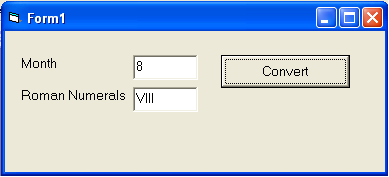
To create a number of letters we often use roman numerals to indicate the month of making the letter.For example, the letter number is '001 / Int/III/2010' where the symbol 'III' indicates that the letter was made in March 2010.
For this we need a function that can convert an integer number from 1 to 12 into roman numerals. In the Visual Basic programming, we can easily create such a function. Well, here we'll show an example program to create such functions, as well as examples of how to use it.
First open your VB program and select standard exe form
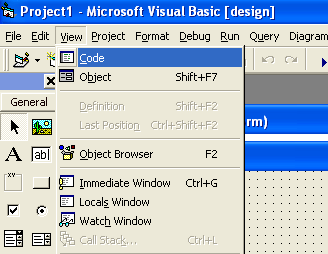
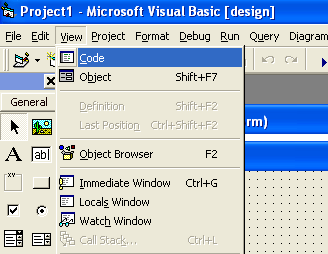
Click the View menu
Click the Code menu
Write the Visual Basic (VB) program code below
Function IToR(i As Integer) As String
   Dim s As String
   s = "I   II  III IV  V   VI  VII VIIIIX  X   XI  XII "
   IToR = Mid(s, (i - 1) * 4 + 1, 4)
End Function
Click the View menu
Click the Object menu
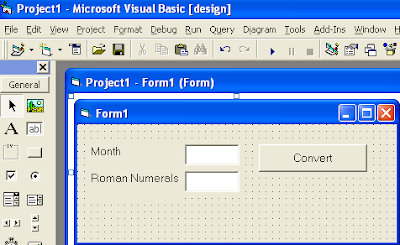
Put two label controls, two textboxes and a CommandButton to the form
Change the Caption of first label into 'Month'
Change the Caption of second label into 'Roman Numeral'
Change the name of the first textbox into 'txtMonth'
Change the name of the second textbox into 'txtRomNum'
Remove texts on the first and second textboxes
Change the name of the CommandButton into 'cmdConvert'
Change the CommandButton caption into 'Convert'
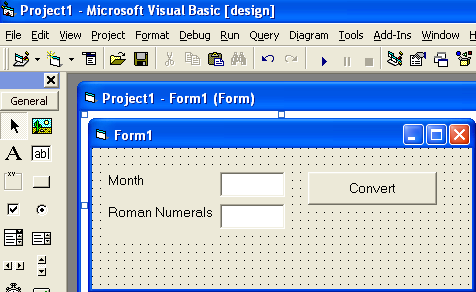
So your Screen design will look like the image below:
Double click CommandButton 'Convert'
Write below Visual Basic (VB) program coding
Private Sub cmdConvert_Click()
   txtRomNum.Text = IToR(Val(txtMonth.Text))
End Sub
Okay, you have completed the program
Now it's time to test
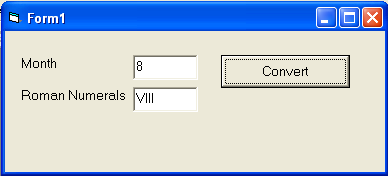
Type a number such as 8 in the first textbox
Click CommandButton 'Convert'
Consider the results